Since I have been tinkering around with Java I find myself using the Javadocs a lot. It contains valuable information as well as an introduction to Java technology lessons. So if you are interested in getting started make sure you have the latest Java SDK (JDK) installed and have the environment system variable set to the correct path.
Here is some good information about JDK 6 Documentation. It is awesome, it tells you what is where! If you are in need of more info then visit the New to Java Programming Center.
Showing posts with label JAVA. Show all posts
Showing posts with label JAVA. Show all posts
Learning Java...

Java FileReader, FileWriter & BufferedReader...
I have been tinkering around with Java's FileReader, FileWriter & BufferedReader; however, this time I will use screen shots to illustrate parts of the code instead of pasting it and formatting it to fit nicely. Extremely time consuming...not like this post will be quick either! So here we go...not sure if I am going to enjoy this post.
1) We instantiate the FileWriter
2) My output file will be "numbers.dat"
3) Write numbers from 1 to 100 separated by "," commas to the "numbers.dat" file
4) Close the FileWriter
5) Instantiate the FileReader
6) Instantiate the BufferedReader
7) Pass data from Buffer to textData variable
8) For Schnitz'N'Giggles for you (Beer Fest) bloaks, let's display all even numbers from 1-100 on the screen
9) Close Buffer
10) Instantiate a second FileWriter
11) Append all odd numbers from 1-100 to "numbers.dat"
12) Close the second FileWriter
13) Instantiate a second FileReader
14) Instantiate a second BufferedReader
15) Pass Buffered data to textData variable
16) Print results to screen
End Results...JOptionPane Window prompts
Create "numbers.dat" file prompt
Display even numbers prompt
Append odd numbers to "numbers.dat" prompt
Display final results prompt
Proof file was created!
Screen output! (Even numbers highlighted)
File data content! (Appended numbers highlighted)
Java Centimeters to Inches Calc...
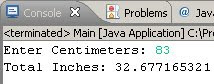
As before here is the Java version of the Centimeters to Inches calculator.
[ Main.java ]
public class Main
{
public static void main(String[] args)
{
GetUserInput.GetInput();
}
}
[ GetUserInput.java ]
import java.util.*;
public class GetUserInput
{
static void GetInput()
{
String strUserInput;
Scanner in = new Scanner(System.in);
System.out.print("Enter Centimeters: ");
strUserInput = in.nextLine();
in.close();
ConvertUserInput.ConvertInput(strUserInput);
}
}
[ ConvertUserInput.java ]
public class ConvertUserInput
{
static void ConvertInput(String s)
{
double d;
d = Double.parseDouble(s);
PerformCalculation.Calculate(d);
}
}
[ PerformCalculation.java ]
public class PerformCalculation
{
static void Calculate(double i)
{
double cm = 0.393700787;
double total;
total = (i * cm);
DisplayResults.Results(total);
}
}
[ DisplayResults.java ]
public class DisplayResults
{
static void Results(double r)
{
System.out.println("total Inches: " + r);
}
}

Hello User Java Edition Console App...
import java.util.*;
public class HelloUser
{
public static void main(String[] args)
{
GetUserInput();
}
private static void GetUserInput()
{
String strInput;
Scanner in = new Scanner(System.in);
System.out.println("Enter your first name: ");
strInput = in.nextLine();
in.close();
System.out.println("Hello " + strInput);
}
}
Hello World Java Edition Console App..
As you can see the syntax is similar to that of C#
public class HelloWorld
{
public static void main(String[] args)
{
Greeting();
}
private static void Greeting()
{
System.out.println("Hello world!");
}
}
Subscribe to:
Posts (Atom)
